2. INSTALLATION
C. Cable Connections
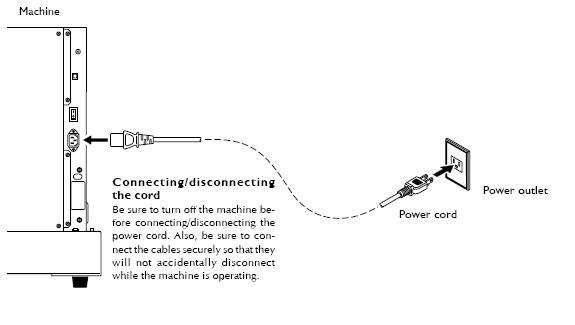
Connecting The Power Cord
- Do not use with any electrical power supply that does not meet the ratings displayed on the unit.
Use with any other power supply may lead to fire or electrocution. - Ground the unit with the ground wire.
Failure to do so may result in risk of electrocution in the event of a mechanical problem. - Perform this task with all power switches left switched off.
Otherwise sudden movement of the machine may cause injury.
Important Notes on the Power Cord
- Never damage the power cord or pull it with force.
Doing so may tear the cord's insulation, causing an electrical short and resulting in electrical shock, electrocution, or fire. - Never place any object on the power cord, bend the power cord using excessive force, or allow the power cord to become deformed.
If it becomes deformed, the deformed location may grow hot and cause fire. - Never use the machine with the power cord bound into a bundle or roll.
If the cord is in a bundle or roll, it may grow hot and cause fire. - Never use any power cord other than the power cord included with the machine. Also, never use a power strip or extension cord.
The power strip or extension cord may grow hot and cause fire. - Do not use with a damaged power cord or plug, or with a loose electrical outlet.
Doing so may lead to fire, electrical shock, or electrocution.
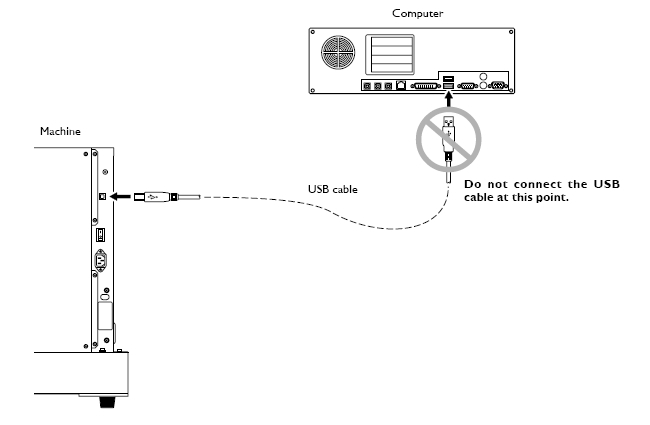
Installing The Windows-based Driver And Connecting To The Computer
- Install the driver following the instructions in the next section.
- Be sure to make the connection between the machine to the computer during the course of installing the driver. If the cable connection is made before you start installation of the driver, driver installation may fail and the machine may become unusable.
- Use a shielded USB cable having a length of 3 meters or less.
- Do not use a USB hub or the like.